
Appearance
Task View 👀
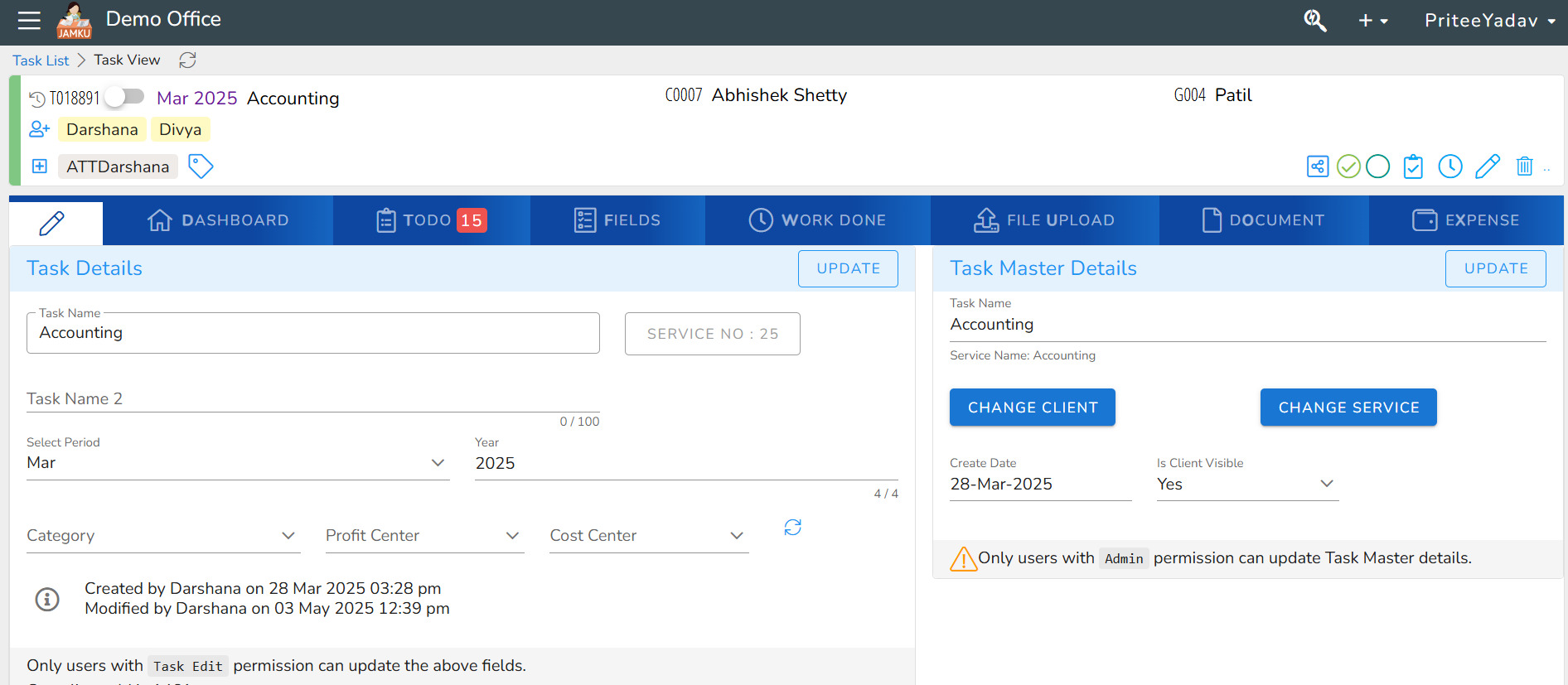
🧾 Task View – Detailed Task Information in Jamku
The Task View screen in Jamku provides a detailed look into an individual task, allowing users to view, update, and manage task-related information. It is a central hub for task management, especially useful for task owners, team members, and admins.
Task Header Overview:
1.Task ID: (e.g., T018891)
2.Period & Year: Displays the period (Mar) and year (2025) for which the task is created.
3.Service Name: e.g., Accounting
4.Client Code & Name: (e.g., C0007 Abhishek Shetty, G004 Patil)
5.Assigned Users: Users like Darshana, Divya are visible with labels.
6.Tags: Shown like ATT Darshana for custom labels.
📋 Tabs Navigation:
Jamku's task view includes multiple tabs for easy navigation and holistic task management:
1.Task Dashboard – Overview and quick task insights.
2.TODO – Shows pending sub-tasks (with count indicator, e.g., 15).
3.Task Custom Fields – Custom task fields created under task types.
4.Work Done – Track work logs and activities completed.
5.File Upload – Upload and access files related to the task.
6.Document – Track generated documents and digital files.
7.Expense – Manage and record expenses for this task.